 Ecom Agent Lab
Guide · 6 October 2026 · Majid Ali Shabrani
AI Lead Qualification with n8n and HubSpot: How I Built a 7-Step Workflow
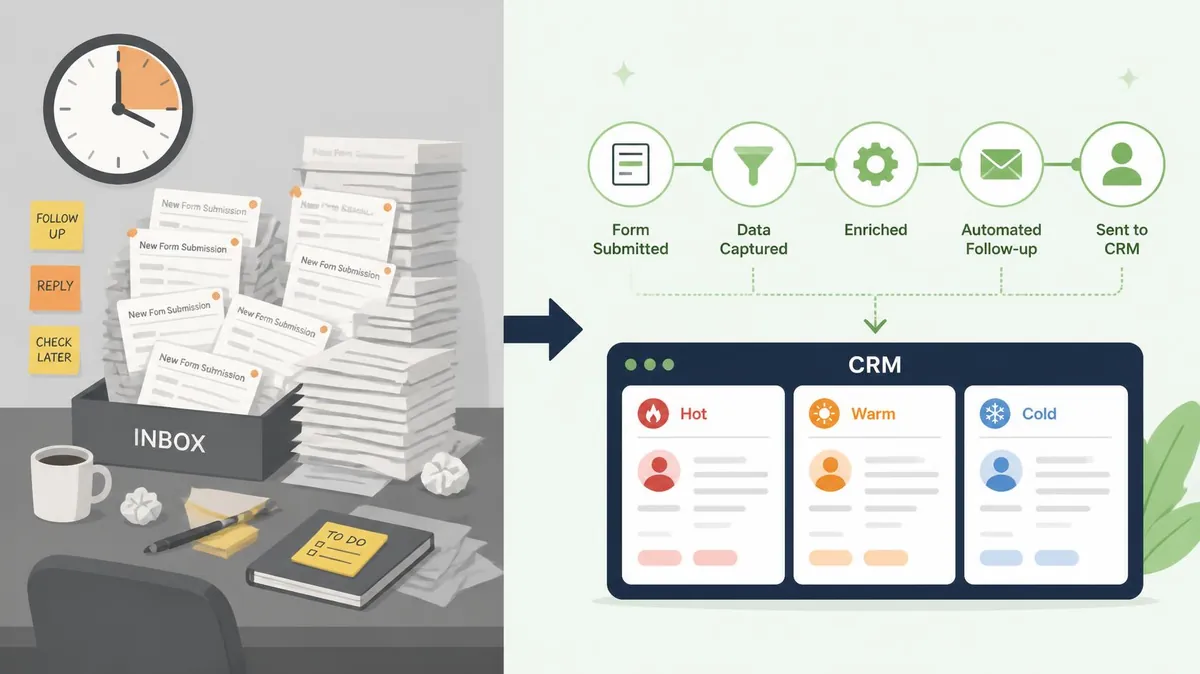
Every business that collects leads through a website form has the same problem: someone has to read each submission, decide if it is worth chasing, and copy the details into the CRM by hand. Follow-up is slow, and some leads get missed completely.
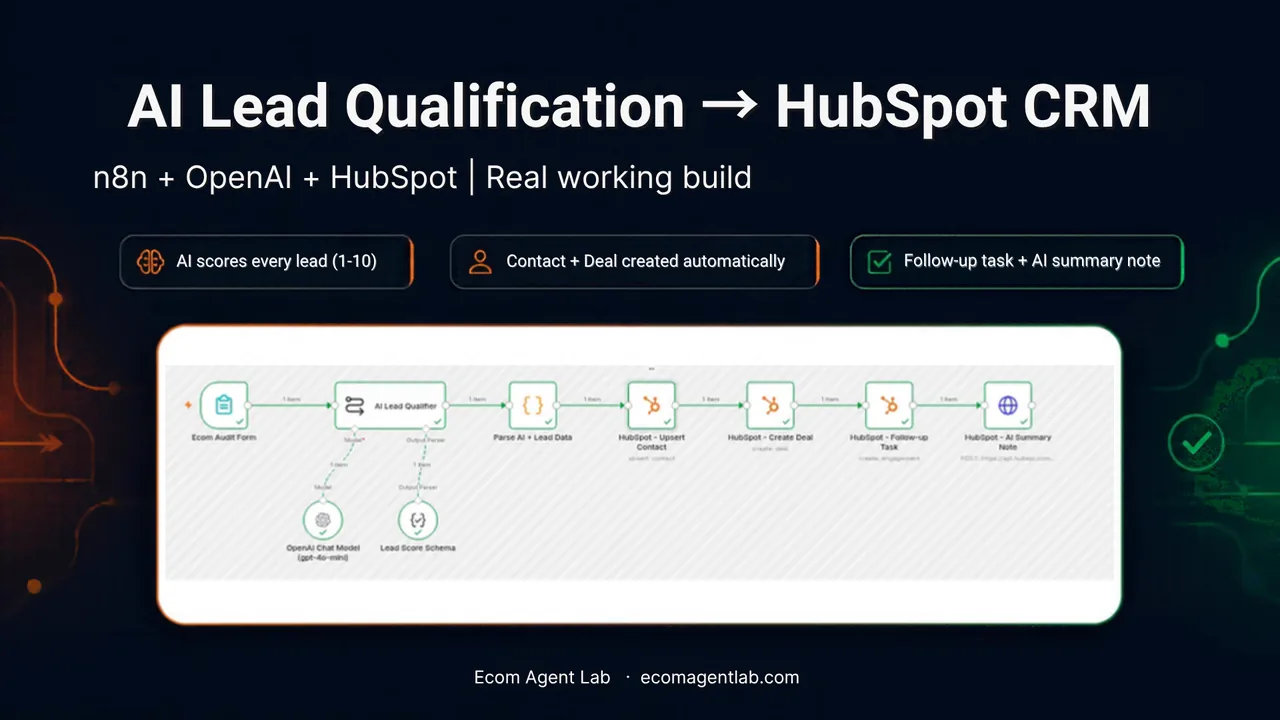
In this post I show a real AI lead qualification workflow I built with n8n, OpenAI and HubSpot. A lead fills in a form, AI scores it, and within seconds HubSpot has the contact, a deal, a follow-up task and a short summary note. I tested it on my own Shopify test store, and I share the real run result below.
What is AI lead qualification?
AI lead qualification means using a language model to read a new lead's details, score how good a fit they are, and decide what should happen next. Instead of a person judging every form submission, the AI applies the same rules to every lead and returns a score, a priority and a short summary.
When this is connected to a CRM such as HubSpot, the result is saved automatically, so your team opens the CRM and already sees which leads to call first.
The problem with manual lead handling
- Leads sit in an inbox until someone has time to read them.
- Each lead is judged by hand, so the decision depends on who is reading and how busy they are.
- Details are copied into the CRM manually, which is slow and easy to get wrong.
- Nobody is reminded to follow up, so good leads go cold.
The solution: one n8n workflow with 7 steps
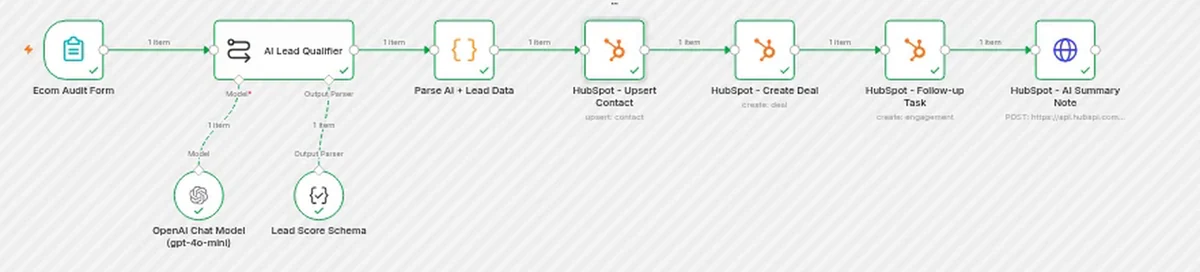
n8n is a workflow automation tool that lets you connect forms, AI models and business apps. If you are new to it, think of it as a visual way to say "when this happens, do these steps". My workflow is named AI Lead Qualification to HubSpot CRM and has seven steps:
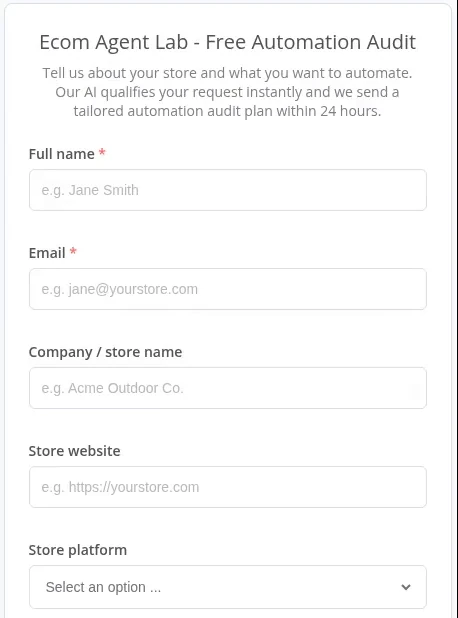
- Form trigger. An n8n form called "Ecom Agent Lab - Free Automation Audit" collects name, email, company, store website, store platform and what the lead wants to automate.
- AI Lead Qualifier. OpenAI gpt-4o-mini reads the form with a structured output schema. It returns a lead score from 1 to 10, a priority (Hot, Warm or Cold), a one-line summary, a suggested automation and an estimated deal value.
- Code node. Cleans and checks the AI output and the form data so bad or missing values do not break the later steps.
- HubSpot: upsert contact. Creates the contact, or updates it if the email already exists, and sets the lifecycle stage to Lead.
- HubSpot: create deal. Creates a deal in a pipeline stage based on priority and associates it with the contact.
- HubSpot: follow-up task. Adds a task due in 24 hours so nobody forgets to reply.
- HubSpot: AI summary note. Adds a note through the HubSpot API so the salesperson sees the context at a glance.
Why use structured output for AI lead scoring?
The most important design choice is asking the AI for structured output instead of free text. When the model must return a score, a priority and a summary in a fixed format, the next nodes can use those values directly. This is what makes AI lead scoring reliable enough to push into a CRM without manual checking.
The Code node after the AI step is a second safety net. It checks that the score is a number in the right range and that the priority is one of the allowed values before anything is written to HubSpot.
Real test result
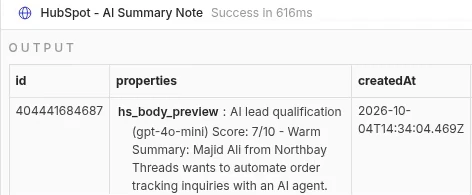
I ran the workflow with a test lead from my own Shopify test store. Here is what the n8n execution log showed:
| Item | Result |
|---|---|
| Execution | #1054, 4 Oct 2026 |
| Run time | 5.8 s (Succeeded in 5.798s) |
| Lead score | 7/10 |
| Priority | Warm |
| HubSpot records created | Contact; deal "Northbay Threads - Automation (Warm)" (AI estimate 2,500); follow-up task; AI summary note |

The AI summary note saved in HubSpot read: score 7/10, Warm, with a short summary that the lead wants to automate order tracking inquiries with an AI agent.
Honesty note: This is a test with my own store, not a paid client project. The deal amount of 2,500 is the AI's estimate for the test lead, not real revenue.
Tools used
- n8n (self-hosted) for the workflow
- OpenAI API (gpt-4o-mini) for scoring
- HubSpot CRM API (service key) for contacts, deals, tasks and notes
Why this matters for e-commerce and small teams
- Every lead lands in the CRM within seconds, with no copy and paste.
- The score and priority show which leads to contact first.
- A follow-up task is created for every lead, so none are forgotten in the inbox.
- Scoring rules stay consistent because the same prompt and schema run every time.
What you can customise for your own business
The same flow can be set up on your own forms and your own CRM. HubSpot is what I tested, but the same idea works with other CRMs such as GoHighLevel or Zoho, though the HubSpot nodes would be replaced and need testing.
- Scoring rules and deal stages that match how you sell
- Slack or email alerts for hot leads
- Lead routing to the right salesperson
- Automatic follow-up emails
Tips if you want to build this yourself
- Start with a small form. Fewer fields make the AI output easier to check.
- Define Hot, Warm and Cold in plain words in your prompt, with a short example of each.
- Use structured output and validate it in a Code node before writing to the CRM.
- Use upsert for contacts so repeat submissions do not create duplicates.
- Test with your own data first and check every created record in HubSpot.
- Add error handling before going live, so a failed API call does not lose a lead.
Frequently asked questions
Can n8n qualify leads with AI?
Yes. n8n can send lead details to an AI model such as OpenAI, receive a score and classification, and then pass the result to a CRM like HubSpot in the same workflow.
Do I need to code to build this?
Very little. Most steps are visual nodes. A small Code node is used to clean and validate the AI output, but it is short and can be adapted.
Can I use Zapier or Make.com instead of n8n?
Yes, the same logic (form, AI scoring, CRM) can be built in Zapier or Make.com. I used n8n because it is flexible and can be self-hosted.
Is AI lead scoring always accurate?
No. It is a helper, not a replacement for judgement. Good prompts, structured output and regular checks of the scores against real outcomes are important.
How long does a setup take?
It depends on your forms, CRM setup and scoring rules. The best way to know is a short call to look at your current process.
See it working
- Demo video (Google Drive, opens in a new tab) (Google Drive)
- Workflow JSON (Google Drive, opens in a new tab) (Google Drive, importable into n8n)
- More demos: see the agents at work
Want a similar lead qualification flow for your store? I offer a free 15-minute automation audit. Tell me what takes up your time and I will tell you what can be automated. Contact: contact@ecomagentlab.com or visit ecomagentlab.com.

Majid Ali Shabrani is the founder of Ecom Agent Lab. He builds AI automation with n8n (order, inventory and lead workflows) and AI agents for WhatsApp and phone calls for e-commerce stores. More about Majid · LinkedIn